
You no longer write your technical file. You steer it.
Import your technical files as they are, in their current format, even incomplete or still in progress. My Audit Corner takes them over, writes, checks compliance and keeps them up to date: new file, product change, new standard or notified body feedback.
- Your files as they are, nothing to re-enter
- Nothing invented: every paragraph has its source
- The decisions stay yours
Free, by selection. Applications close on 15 December.See how it works
Apply for the beta
Beta reserved for My Audit Corner customers, current and new.
The reality
Writing and updating technical documentation: hours nobody sees
Weeks of copy and paste.
Writing and updating technical documentation means taking information that already exists elsewhere and copying it, document after document. Long, low-value work.
The knock-on effect.
One risk analysis is updated, and other documents have to follow. Always with the same fear: missing an impact.
Inconsistencies.
One partial update is enough for two documents to stop saying the same thing. The auditor spots it.
Costly nonconformities.
Every notified body finding on the technical documentation is paid for in rework and back-and-forth.
What if you spent that time deciding, rather than copying?
What the generator does
The technical file generator: it writes, you steer
1. It reads your sources. Documents, test reports, specifications, code repositories, another product's file. You add more whenever you like; it never modifies them. It follows your QMS procedures, which it knows through My Audit Corner.
2. It searches public databases. Literature, vigilance and recalls, EUDAMED. Every search is dated and can be run again identically.
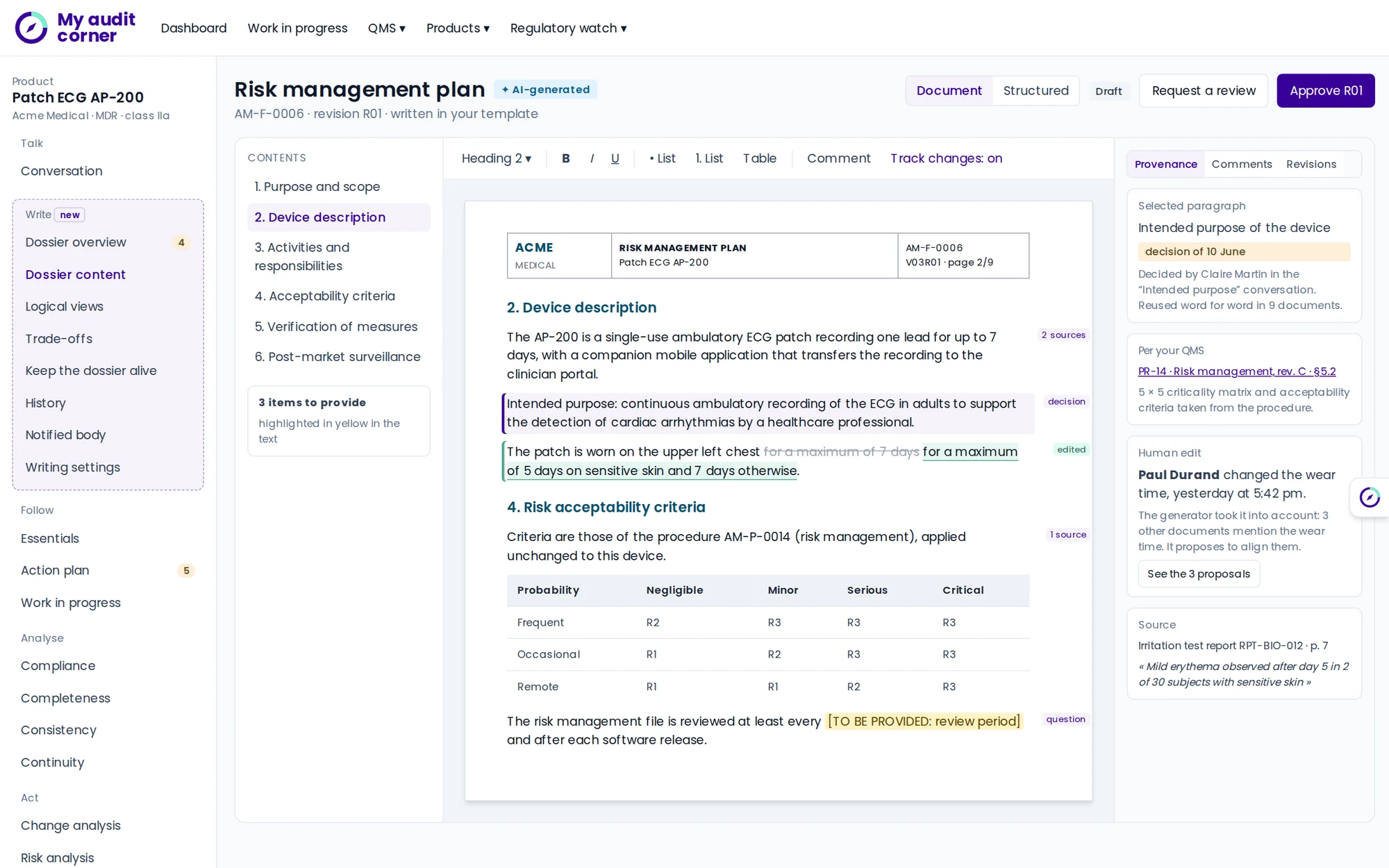
3. It writes in your templates and shows where every paragraph comes from. Anything missing is flagged "to be provided", never invented.
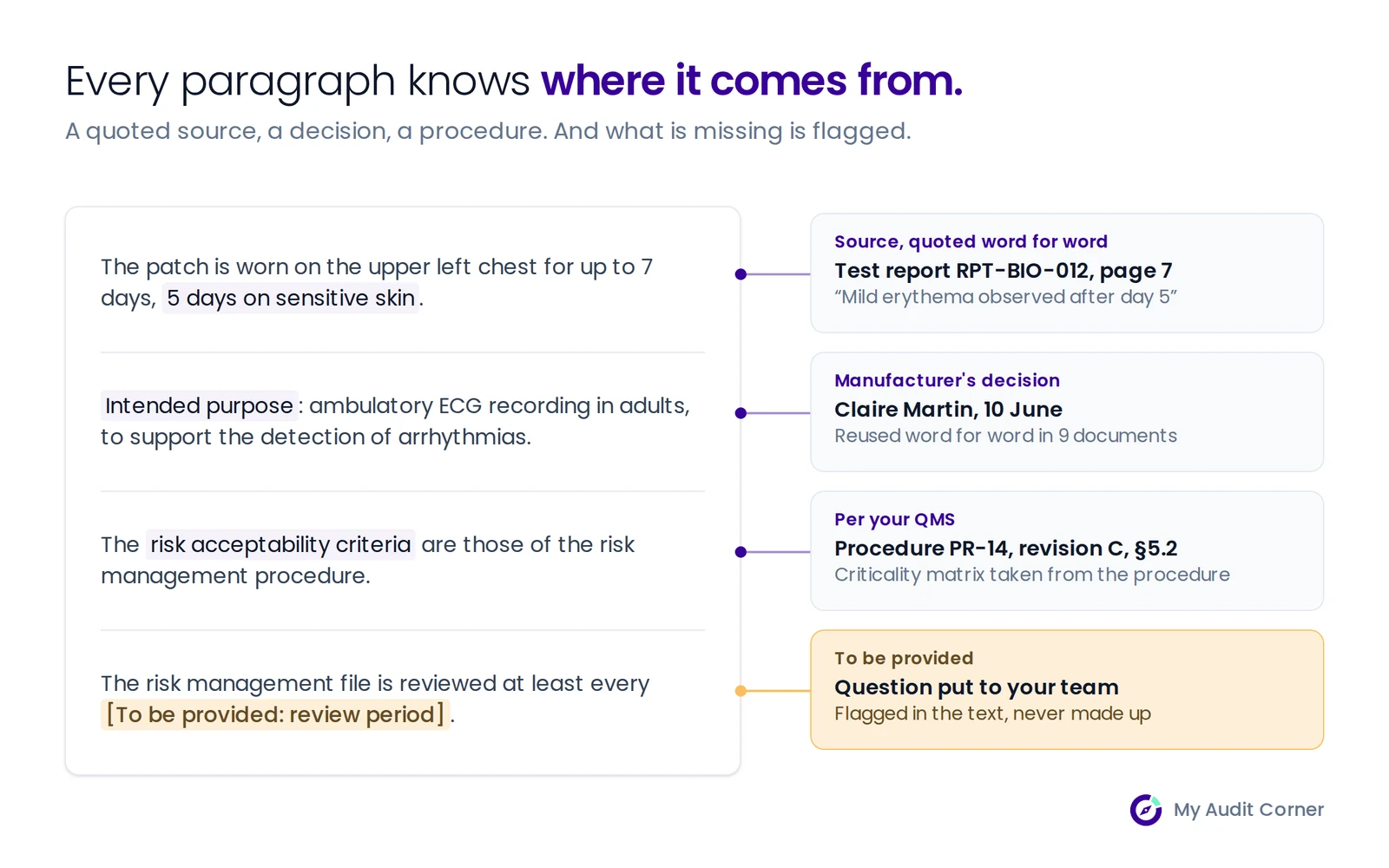
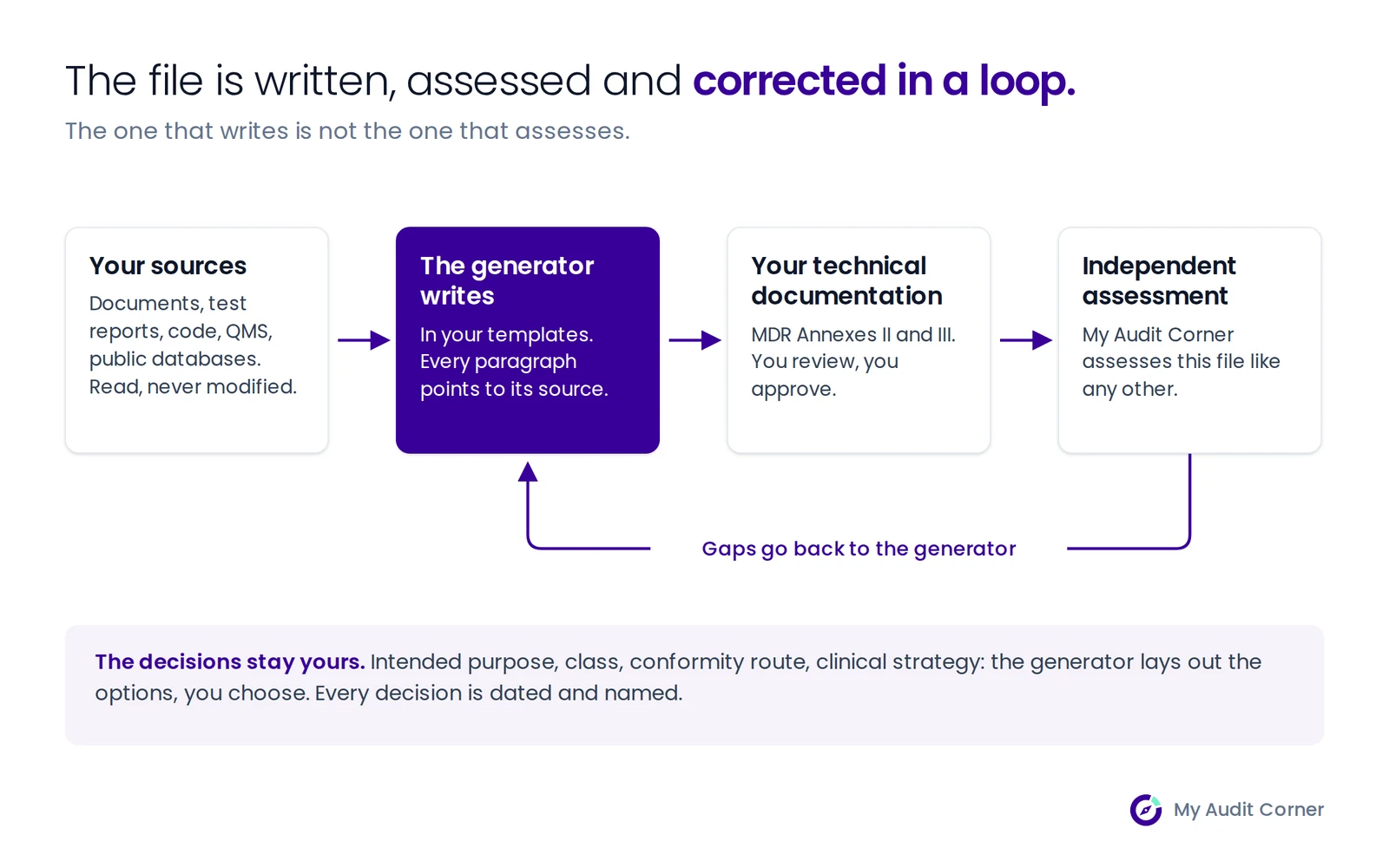
4. It leaves the decisions to you. Intended purpose, class, conformity assessment route, clinical strategy: it lays out the options, you choose. Every decision is dated and signed by name.
5. The file is assessed independently. Any gaps found go back to the generator.
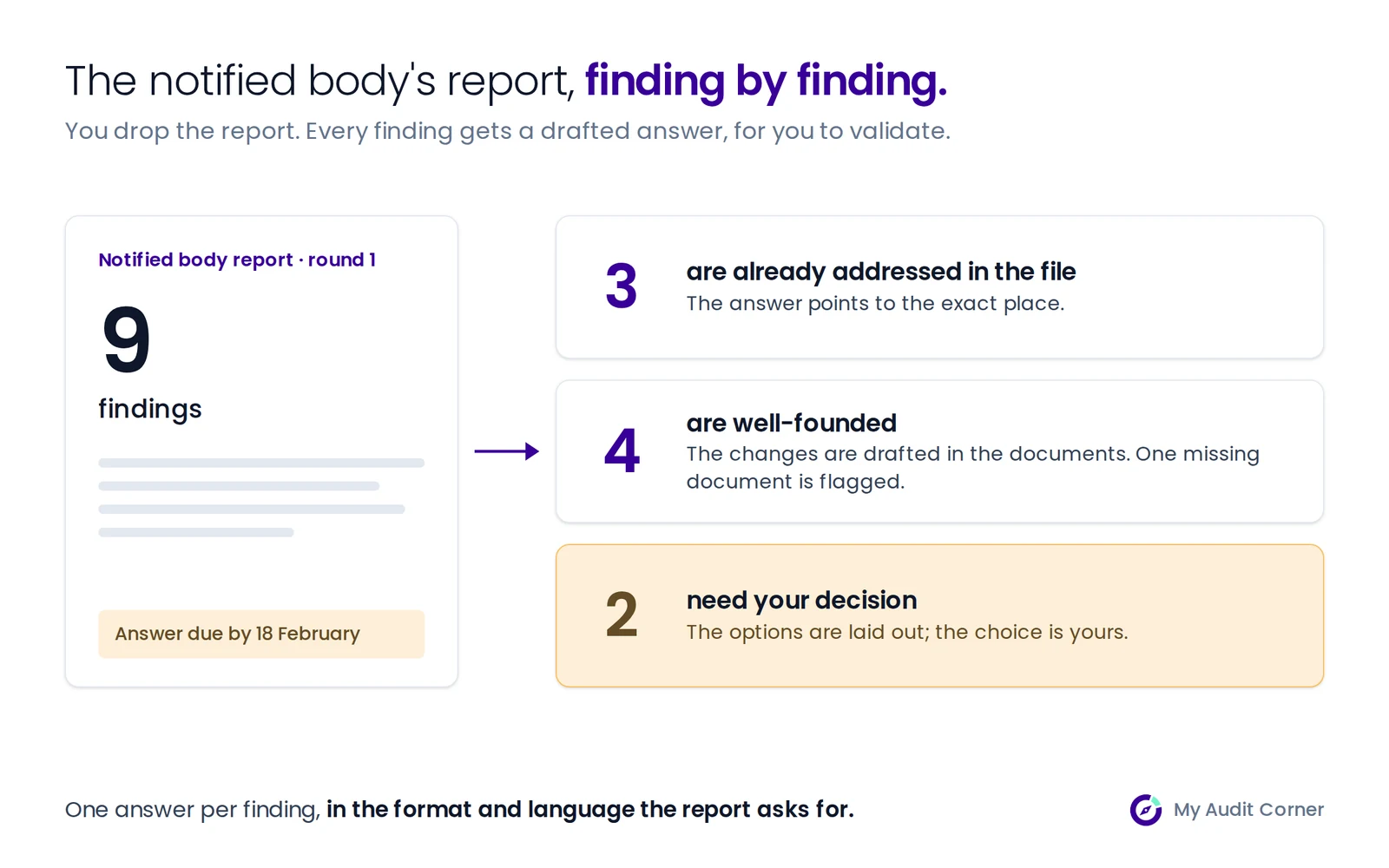
6. It prepares the answer to the notified body. One answer per finding, in the format the report asks for.
7. It keeps the file alive after certification. Changes, software versions, complaints, standards, procedures, PSURs.
Useful all the time
Updating your technical file: useful all the time, not just before submission
Technical documentation does not stop on the day of certification. Wherever you start from:
You are building a first file.
You start from your sources, not from a blank page.
You received the notified body's report.
Every finding gets its answer, in the expected format.
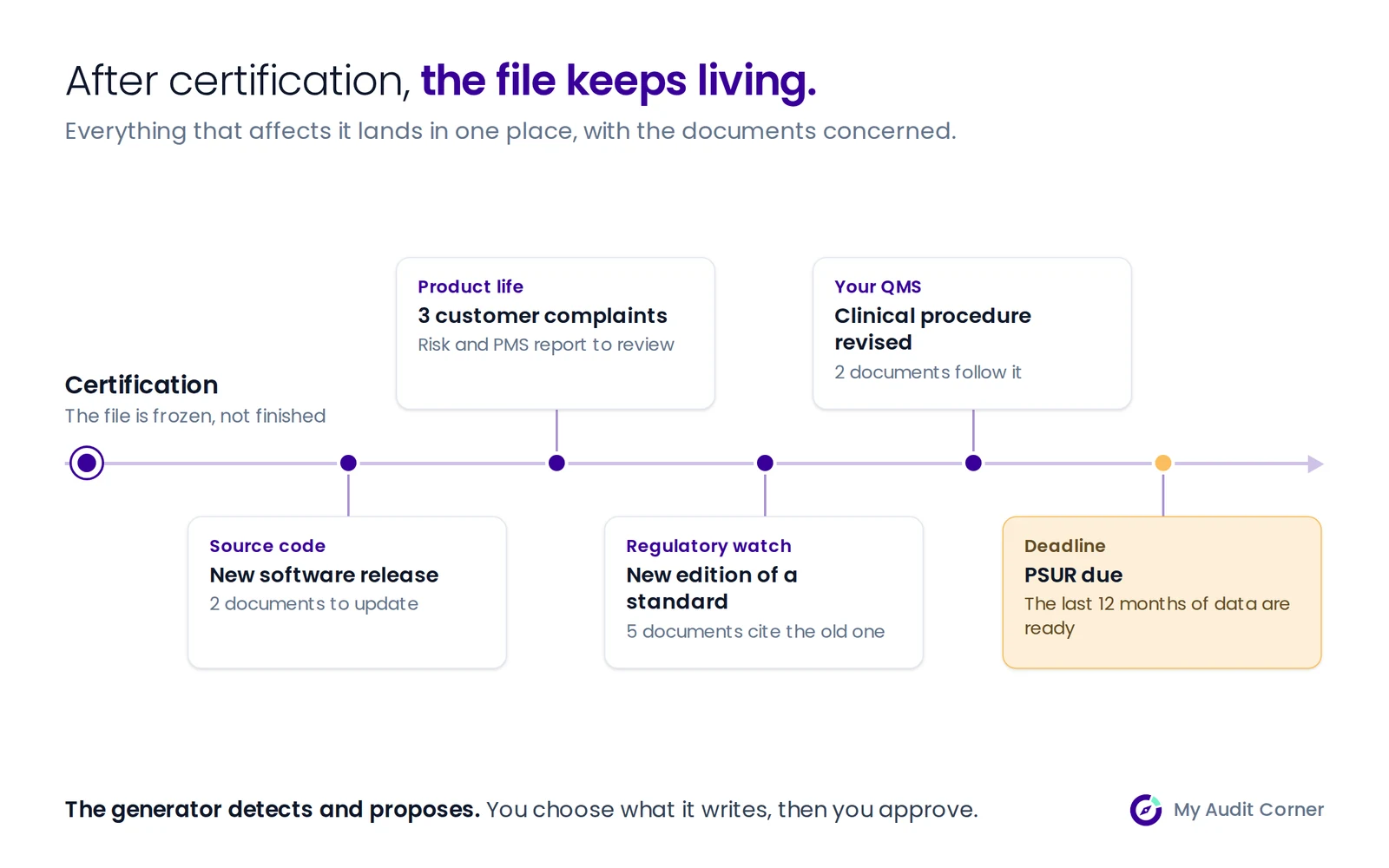
Your product changes.
The change is carried into the documents that depend on it.
A standard evolves.
The file follows the new edition of the standard.
And also: your PSURs and every new software version.
Read also: Check your technical file before submission·Answer notified body nonconformities
Your benefits
What you gain
No more blank page.
You start from a document drafted from your own sources.
Every sentence is defensible.
Every paragraph is linked to its source, to a decision or to a procedure.
Nothing invented.
You know exactly which evidence to provide.
You stay in control.
Decisions remain yours, dated and signed by name.
Gaps caught before the notified body sees them.
The independent assessment surfaces them before submission.
The file never goes stale.
It follows your changes long after certification.
Your QMS and your file speak the same language.
The file relies on your own procedures.
The beta is open
Free, by selection. Applications close on 15 December 2026.
How it works
- 1We look at your technical file together, as it is. Complete, incomplete or still in progress, in its current format. Nothing to re-enter.
- 2You set the course. Your choices, your strategy, your current priorities. The decisions stay yours.
- 3The generator writes. We run it on your file: it reads your documents without ever modifying them, writes in your templates and shows where every paragraph comes from. A few minutes, where drafting usually takes weeks. Anything missing is flagged "to be provided", never invented.
- 4We refine it together. We go through what the generator brought to light with you: missing evidence, inconsistencies, points to decide. You receive a drafted file, which then evolves with your changes.
Beta testers who become My Audit Corner customers keep the feature free of charge.
Apply for the beta
Beta reserved for My Audit Corner customers, current and new.
Not available for the beta?
Follow our LinkedIn page: all the details will be published there at launch, in early 2027.
Frequently asked questions
Does the generator invent content?
No. Every paragraph is linked to its source, to a decision or to a procedure. Anything missing is flagged "to be provided".
Do we need to rework or migrate our existing technical files?
No. You import your files as they are, in their current format, even incomplete or still in progress. My Audit Corner reads them, structures them and spots what is missing: nothing has to be re-entered.
Who makes the regulatory decisions?
You do. Intended purpose, class, conformity assessment route, clinical strategy: the generator lays out the options, you choose. Every decision is dated and signed by name.
Are my documents modified?
No, the generator reads your sources without ever modifying them.
Is it useful if my technical file already exists?
Yes. Product change, new standard, notified body feedback, PSUR: the generator keeps the file alive after certification.
How does the beta work?
We look at your technical file together as it is, you set the course, the generator writes in your templates, then we refine together what it brought to light. You receive a drafted file, which then evolves with your changes. The decisions stay yours.
How much does the beta cost?
It is free, by selection. Beta testers who become My Audit Corner customers keep the feature free of charge.
Who can take part?
The beta is reserved for My Audit Corner customers, current and new. Applications close on 15 December 2026.
When does the generator launch?
In early 2027. Follow our LinkedIn page to stay informed.
Your starting point
Your technical files, as they are today
No template to fill in, no manual rework. You start from your technical files in their current format, complete, incomplete or still in progress.
You import them as they are.
Word, Excel, PDF, from SharePoint, OneDrive or Google Drive: your documents keep their format and their place. My Audit Corner connects to them.
My Audit Corner structures them.
It reads every document, links the information together and spots what is missing or contradictory. The file becomes structured, with nothing to re-enter.
You steer, it writes.
Additions, updates, answers to the notified body: everything is written in your templates. You decide, you approve.
Everything you expect from a technical file management tool, without a migration project.